








If you’re trying to figure out how to deploy Bipod BF6, you’re not alone. All BF6 players are trying to figure out the best methods to use it the right way. It is without any doubt one of the most underrated attachments in the game. The main reason is that it helps you control your shots as well as make them smoother than before.
Equip the Bipod First
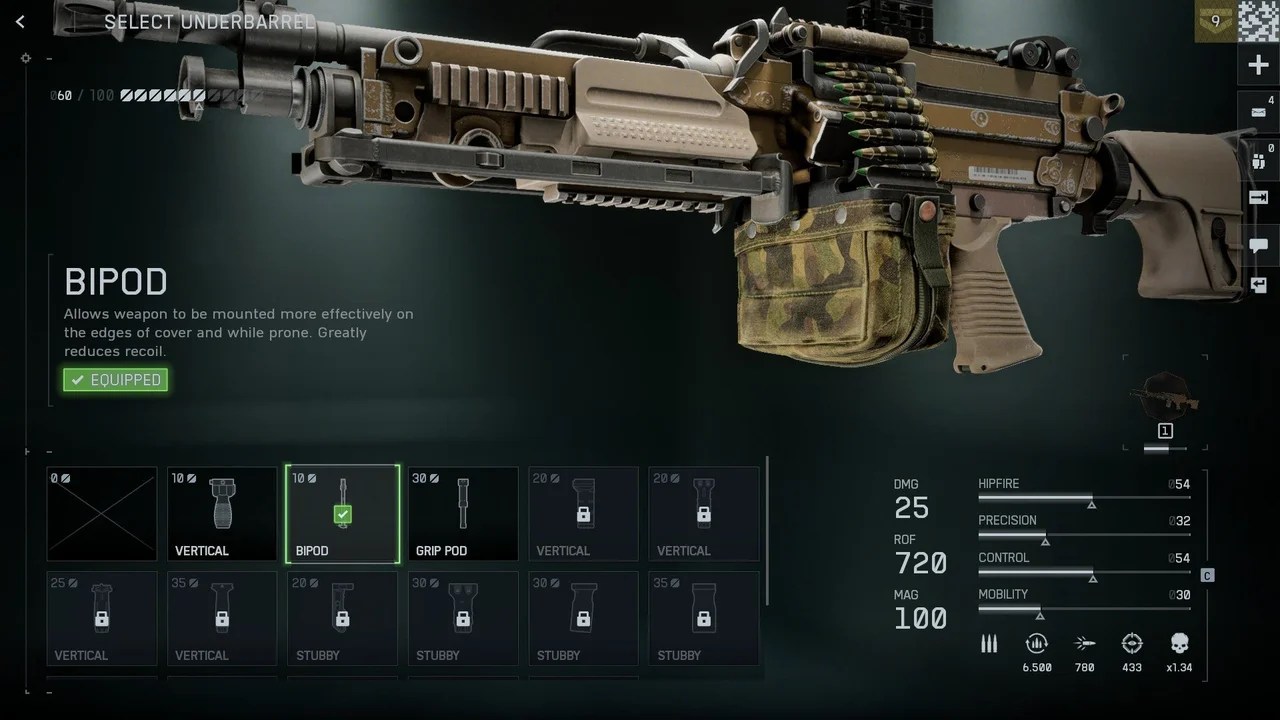
Before worrying about how to deploy Bipod BF6, make sure it’s equipped. Not every weapon supports it. Sniper rifles and LMGs have it from the start. But for DMRs or assault rifles, you’ll need to unlock it by leveling up.
Head to your loadout screen. Choose your weapon and go into customization. The bipod will be under the Underbarrel section. Equip it there, save your setup, and you’re ready to take it into battle.
How To Deploy Bipod BF6 In-Game
When you successfully equipped this attachment, now you move towards the right way to use it.
You need to understand that this Bipod in Battlefield 6 does not deploy automatically after equipping it. You have to be on a flat and clear surface. For example, you can use a wall or a sandbag. There’s also an option to deploy it when prone.
On PC, press F or V while aiming down sights. On the controller, hold R3. You’ll see a small prompt confirming it’s deployed. Once it locks, you’ll immediately feel the difference. Your gun becomes steady, recoil nearly disappears, and aiming feels buttery smooth.
What the Bipod Actually Does
Knowing how to deploy Bipod BF6 is only half the skill. The other half is understanding what it does. When deployed, it reduces recoil and weapon sway dramatically. This makes long-range fights easier and helps you land shots you would normally miss.
Snipers will love how stable it makes scoped shots. LMG users can control choke points with steady streams of fire. It’s like turning your gun into a mounted turret. But remember, when it’s deployed, you can’t move freely.
When To Use the Bipod
The bipod is perfect for defense and long-range support. If you’re holding down an objective or covering a lane, it’s your best friend. You’ll mow down enemies before they even get close.
Avoid deploying it in open areas. You’ll become an easy target for snipers or flankers. Always use solid cover or high ground. Once you master timing and positioning, how to deploy Bipod BF6 becomes second nature.
Tips For Using Bipod
At times, it happens that nothing changes when you press the key to deploy the bipod. You don’t need to panic at that time because it’s usually associated with the surface. Maybe it’s not flat.
So, you need to move slightly or try a different angle. Uneven terrain can prevent deployment.
If you’re still unsure, test it in the firing range. You can easily practice there without pressure. Get a feel for how close you need to be to cover before the bipod activates. Once you get that rhythm, it’ll become muscle memory.
How To Use Bipod With Different Classes
Support players benefit the most. With an LMG, you can hold a position forever. Recon players also get huge value. Your scope sway disappears completely, making headshots much easier.
If you’re learning how to deploy Bipod BF6 as a beginner, focus on positioning. Set up near objectives or sightlines that your team struggles to hold. You’ll quickly see how much of a difference it makes in both accuracy and survival.
Drawbacks You Should Know
Precision comes at a cost. Once deployed, you’re stuck in place. You can only aim within a small arc. If enemies rush your flank, you’ll need to undeploy before turning.
That’s why communication helps. Ask teammates to watch your sides while you lock down long-range targets. Playing smart with the bipod can turn you into your squad’s anchor during heated matches.
Final Thoughts
Learning how to deploy Bipod BF6 properly is all about timing and awareness. Equip it, find a flat surface, aim, and deploy. Upon deploying it, you will notice that you’re now hitting cleaner shots and also you can control the recoil much better than before.
It’s quite different from other BF6’s attachments as it greatly improves your combat ability. Moreover, the bipod gives you a tactical edge that other players often overlook.
Are you among those players who want to unlock attachments faster as well as level up quickly? Then you should consider getting the Battlefield 6 bot lobbies from MitchCactus. With the help of these bot lobbies, you can rack up 250-300 kills per match easily as well as boost XP while also unlocking weapon mastery fast.


