







Introduction
Getting a BO7 code redemption error? Yep — it’s a common hiccup for players trying to claim bundles, promos, or special Yeti-themed rewards. No worries — it happens to the best of us.
This guide will break down:
- Why code errors happen
- How to fix them quickly
- Tips to avoid future issues
By the end, you’ll know exactly what to do to get your rewards without any headaches.
What Is a BO7 Code Redemption Error?
A code redemption error occurs when Black Ops 7 can’t process a code for some reason. These codes are used to unlock:
- Bundle items (like weapon skins or Yeti-themed cosmetics)
- Promo codes from events or brand collaborations
- Gift codes or digital rewards
Errors don’t mean the code is “broken” — most of the time, it’s an easy fix.
Common Reasons for Code Redemption Errors
1. Typing Errors
Yep, the simplest mistakes are the most common. Watch for:
- Confusing letters with numbers (O vs. 0, I vs. 1)
- Extra spaces at the start or end
- Wrong capitalization
2. Already Redeemed Codes
Most codes are one-time use. If the code has already been used — even on another account — it will trigger an error.
3. Expired Codes
Many codes are seasonal or promotional. Expired codes cannot be redeemed.
4. Platform-Specific Codes
Some codes only work on:
- PlayStation accounts
- Xbox accounts
- PC accounts (Steam or Battle.net)
Crossplay does not automatically validate codes on the wrong platform.
5. Network or Server Issues
Temporary server outages can prevent code redemption. Usually, waiting a few minutes or restarting BO7 resolves this.
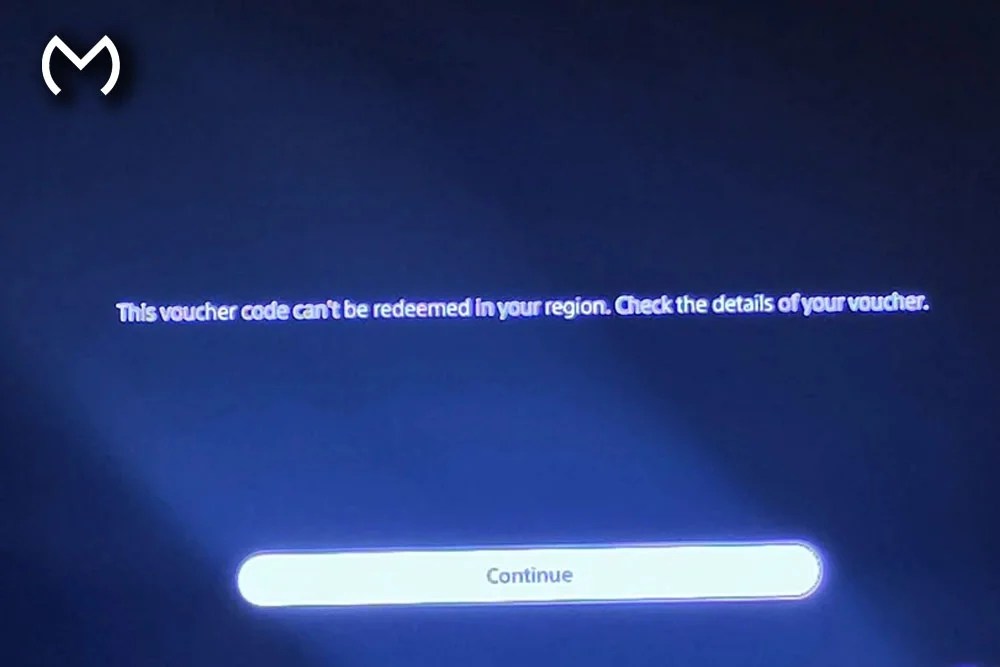
6. Regional Restrictions
Some codes are restricted by region. For example, a US-only promo code won’t work on a European account.
How to Fix BO7 Code Redemption Errors
Step 1: Double-Check the Code
- Retype carefully or copy/paste
- Remove extra spaces or punctuation
- Confirm characters (I vs 1, O vs 0)
Step 2: Verify the Code Status
- Ensure it hasn’t already been redeemed
- Check expiration dates
- Confirm the region is correct
Step 3: Redeem on the Correct Platform
- Use the console or PC intended for the code
- Check account login if you have multiple accounts
Step 4: Restart the Game or Device
- Restart BO7
- Retry redeeming the code
- Refresh the in-game store if needed
Step 5: Contact Official Support
- Submit a ticket with code details, account info, and screenshots
- Support usually resolves redemption issues quickly
Common Error Messages Explained
| Error Message | What It Means | How to Fix |
| Code invalid or expired | Typo, expired, or region mismatch | Double-check code, platform, and region |
| Code already redeemed | Used before on your or another account | Confirm usage history |
| Code cannot be redeemed on this platform | Platform mismatch | Use the code on the correct console/PC |
| Server unavailable | Temporary server issue | Wait and retry later |
Preventing Future Redemption Errors
- Copy and paste codes carefully to avoid typos
- Redeem codes promptly to avoid expiration
- Track platform-specific codes to avoid mistakes
- Stay updated on official COD announcements for promotions
- Purchase bundles from trusted marketplaces like MitchCactus to ensure codes are valid
Bundles and Codes: A Real Example
Some BO7 bundles include redeemable codes for cosmetics. For example, the BO7 Yeti Domino’s bundle comes with a code for Yeti-themed items.
Always check:
- Is the code platform-specific?
- Has it expired?
- Did you type it correctly?
Following these steps prevents most errors before they happen.
Extra Pro Tips
- Keep a code log: Track redeemed codes to avoid duplicates
- Check multiple devices: Some codes work better on web redemption portals
- Stay on top of events: Seasonal events often include codes that expire quickly
- Account restrictions: Parental controls or region settings may block redemption
Troubleshooting Scenarios
Scenario 1: Code Not Working on PC
- Make sure it’s for Steam or Battle.net
- Restart the client
- Retry redemption
Scenario 2: Server Down During Redemption
- Wait 10–15 minutes
- Retry or try a different network connection
Scenario 3: Promotional Code for Bundle Doesn’t Work
- Confirm bundle purchase
- Check platform
- Contact support if still failing
FAQs
Q: Can server downtime cause code errors?
A: Yep — temporary server issues are common. Retry later.
Q: Do free promo codes expire?
A: Yes, most are seasonal or limited-time.
Q: Can I reuse a code on another account?
A: No, codes are strictly one-time use.
Q: My bundle code isn’t working — what now?
A: Check platform, code entry, and server status. Contact support if needed.
Conclusion
A BO7 code redemption error can be annoying, but most issues are easy to fix. Double-check your code, verify platform compatibility, and confirm it hasn’t expired or been redeemed. Using trusted marketplaces like MitchCactus ensures your bundles and codes are valid and current.
All good — with these tips, you’ll be back to claiming Yeti rewards, cosmetic bundles, and exclusive promos in no time.


