Introduction
If you’re getting ready to jump into Call of Duty Black Ops 7, one thing matters more than anything else before you hit that Install button — whether your PC can actually run the game the way it’s meant to be played. BO7 is bigger, heavier, and more detailed than older COD titles, especially Black Ops 6. The textures are sharper, the maps are denser, and the lighting feels closer to what we usually see in high-end single-player AAA games.
Because of these upgrades, players with older or mid-range PCs sometimes start seeing FPS drops, stutters, and shader issues. And honestly, nothing feels worse than your aim freezing right as you’re about to win a gunfight. That’s why checking the system requirements early is important. Once you know how BO7 performs on your machine, you can set expectations, adjust your graphics, or decide whether it’s time for an upgrade.
Most players who plan their BO7 progression ahead also explore services via the Black Ops 7 services hub on MitchCactus, but the foundation of everything still begins with your hardware. So let’s go through the full breakdown in a clean, simple, and player-friendly way.
Why Black Ops 7 Demands Stronger Hardware
BO7 pushes more detail than BO6 in almost every area. The environments feel heavier with fog, reflections, debris, and small dynamic elements that keep moving around you. Even Zombies mode has gotten a massive visual boost, with new lighting effects and more active enemies on screen at once.
Higher visual density is great, but it means your GPU and CPU stay under constant load. That’s one reason why many players running entry-level hardware pair their progression with BO7 camos boosting so grind-heavy challenges don’t feel slow.
Some players even compare this with BO6 camos boosting, just to understand how big the performance jump is between the two games.
All of this makes one thing clear — BO7 performs beautifully on good hardware, but weak systems will struggle. Knowing your specs helps you decide how far you can push things.
Minimum System Requirements
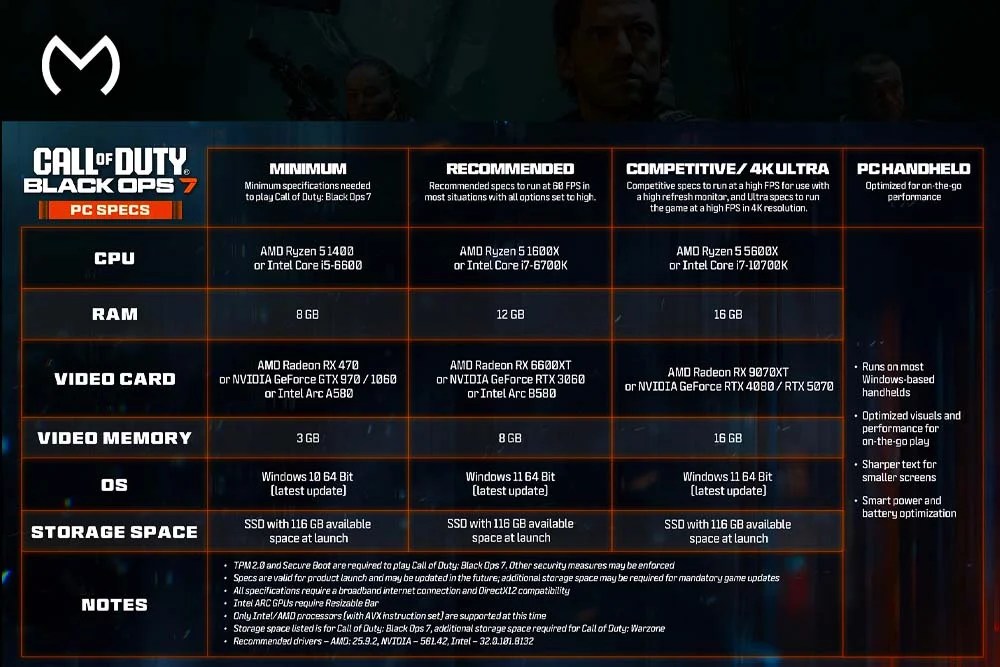
If your goal is just to play the campaign or enjoy standard multiplayer on low settings, the minimum tier will handle the basics. You won’t get crispy visuals or high FPS, but the game becomes playable.
Minimum Specs
- OS: Windows 10
- CPU: Intel i5-6600 or Ryzen 5 1400
- GPU: GTX 970 / GTX 1060 or RX 470
- VRAM: 3–4 GB
- RAM: 8 GB
- Storage: Around 115 GB on an SSD
- Other: DirectX 12, Secure Boot, TPM 2.0
If your system looks similar to this, expect to run the game on low textures and reduced effects. Stability improves a lot if you keep your background apps closed. And if your PC struggles during progression, players at this tier often rely on BO7 camos boosting to save time on grind-heavy unlocks.
Recommended Requirements for Smooth 1080p Gaming
This tier is perfect for most gamers looking for a clean mix of visuals and performance. You get sharper lighting, better textures, and a stable FPS range, especially during large gunfights.
Recommended Specs
- OS: Windows 11
- CPU: Intel i7-6700K or Ryzen 5 1600X
- GPU: RTX 3060 or RX 6600 XT
- VRAM: 8 GB
- RAM: 12 GB
- Storage: SSD
On these specs, BO7 looks great without needing extreme tuning. Players who like their weapons and characters looking extra clean often pair high settings with premium skins like the Singularity camo unlock since it stands out best under stronger lighting.
Competitive System Requirements for High FPS
If you love fast gunfights, aggressive movement, slide cancels, and clutch plays, this tier makes a massive difference. High FPS improves aim tracking, bullet registration, and overall game feel.
Competitive Specs
- CPU: Ryzen 5 5600X or Intel i7-10700K
- GPU: RTX 4070 or RX 7900 XT
- VRAM: 12–16 GB
- RAM: 16 GB
- Storage: NVMe SSD recommended
Competitive players who don’t want to deal with early-level grinding often start with BO7 accounts for sale so they can instantly jump into ranked matches with upgraded weapons and unlocked features.
Ultra and 4K Requirements for Maximum Visual Experience
If you’re going all-in on visuals and want BO7 to look cinematic, this is the tier for you. It’s especially great for players who enjoy Zombies, where particle effects and shadows become extremely detailed.
4K Ultra Specs
- CPU: Ryzen 7 or high-end Intel i7
- GPU: RTX 4080, RTX 5070, or RX 9070 XT
- VRAM: 16 GB
- RAM: 16 GB or higher
Storage: NVMe SSD (required for best performance)
Ultra settings bring out the smaller details. Zombies look far more atmospheric, multiplayer maps look sharper, and weapon skins look significantly better. Players who like visually complete setups often unlock premium cosmetics like the Infestation camo unlock or prestige visuals such as the Genesis camo unlock to match their high-end displays.
Extra Tips to Improve BO7 Performance
A few small tweaks can boost your game’s stability:
✔ Use an SSD
The game streams lots of textures, so HDDs create micro-stutters.
✔ Update your GPU drivers
NVIDIA, AMD, and Intel release optimized drivers before and after launch.
✔ Enable Secure Boot and TPM 2.0
These are required for anti-cheat. If they’re off, the game will refuse to start.
✔ Update Windows regularly
Older builds cause shader issues and random crashing.
Players also keep an eye on early seasonal rewards, especially the Monster Energy rewards because they provide bonus items that help during launch weeks.
How MitchCactus Helps BO7 Players
Every major progression boost, camo unlock, or account upgrade is organized inside the Black Ops 7 services hub. Instead of searching through different pages, you get everything under one clean category. Whether you’re unlocking mastery camos, redeeming promo rewards, or starting BO7 with a boosted account, the ecosystem makes it super simple to navigate.
Camos like Singularity, Infestation, and Genesis especially stand out when paired with higher graphics settings. They bring your loadout to life, especially if you’re running strong hardware.
Conclusion
That wraps up everything you need to know about the full Black Ops 7 system requirements. Whether you’re on a budget PC or planning to run BO7 at full 4K ultra settings, understanding your system helps you avoid stutters, delays, and unnecessary frustration.
And when you’re ready to speed up your progression, unlock rare camos, or start BO7 with a powerful account, everything is already waiting for you inside the Black Ops 7 services hub. With clean organization and all services in one place, leveling up your BO7 experience becomes way easier.
Take a look around, explore your options, and jump into BO7 with the smoothest experience possible.