






























If BO7 crossplay is not working, first identify whether the problem affects the crossplay setting, your Activision friends list, party invitations, network connection, or platform permissions.
Black Ops 7 supports cross-platform parties across PlayStation, Xbox, and PC. However, one restricted setting, an incomplete update, an incorrect Activision ID, or a temporary service problem can prevent friends from joining.
Work through the fixes below in order. Test the party after each major step rather than changing every account and network setting at once.
Why Crossplay Breaks in Black Ops 7
The most common causes include:
- Crossplay set to Off or Console Only
- Different game versions between party members
- An incorrect or outdated Activision friend entry
- Party privacy set to Closed or Invite Only
- PlayStation or Xbox privacy restrictions
- Child or family-account permissions
- Activision or platform service disruption
- Strict NAT or a restricted shared network
- A stale game, launcher, or console session
- Incorrectly linked platform accounts
Match the Symptom to the First Fix
| Problem | Start With |
|---|---|
| PC friend cannot join a console player | Crossplay mode and console privacy |
| Friend appears offline | Activision ID, Social tab, and game restart |
| Invitation sends but joining fails | Party privacy, game version, and NAT |
| Every friend or playlist fails | Server and platform status |
| Voice chat fails but the party works | Communication and voice settings |
| Progress or owned content looks wrong | Activision account linking |
1. Make Sure Crossplay Is Actually Enabled
Open:
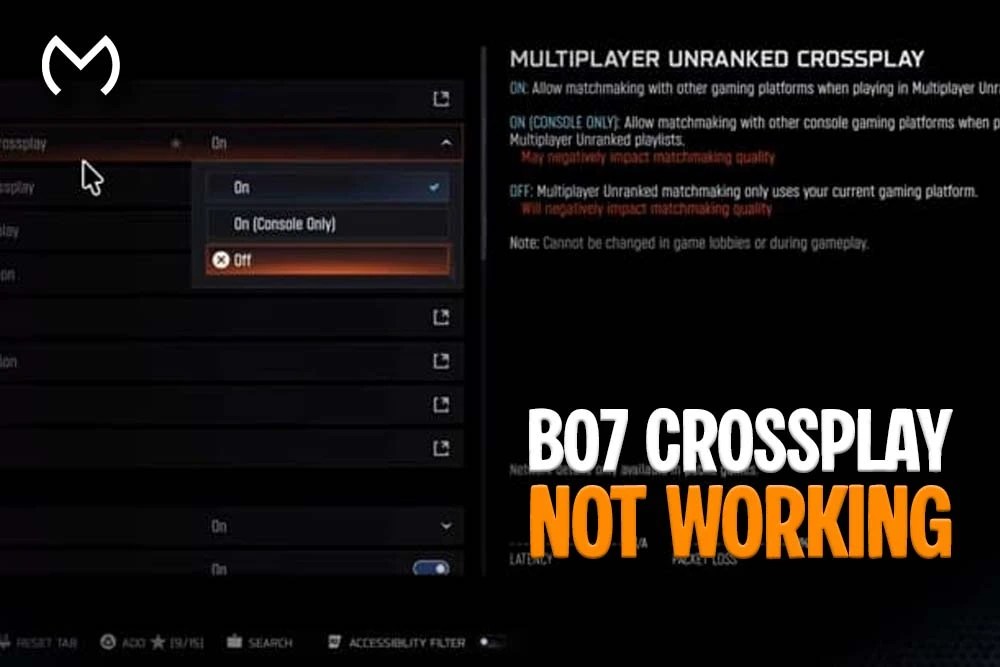
Settings → Account & Network → Crossplay
Depending on your platform and playlist, BO7 may show:
- On: Allows PlayStation, Xbox, and PC matchmaking.
- On – Console Only: Allows Xbox and PlayStation players but excludes PC.
- Off: Restricts matchmaking to the same platform.
Choose On when your party includes a PC player. Console Only will prevent that player from joining even though crossplay is technically enabled.
Some playlists keep separate crossplay choices, so check the setting for the mode you plan to play. After changing it, return to the main menu or restart the game so the new choice applies correctly.
The broader Black Ops 7 Crossplay Guide covers platform compatibility, cross-progression, Multiplayer, and Zombies support separately from these troubleshooting steps.
2. Update BO7 on Every Platform
All party members need the current game build and required shared content.
Check for updates through:
- PlayStation game options
- Xbox My Games & Apps
- Steam Downloads
- Battle.net’s Check for Updates option
- The Xbox app or Microsoft Store on PC
Also confirm that no Call of Duty content pack remains queued or partially installed.
One player can sometimes reach the main menu before a background update finishes. However, party joining and matchmaking may fail until every member completes the same patch and restarts the game.
3. Fully Restart the Game and Platform Session
Do not leave Call of Duty suspended.
- On Xbox, highlight the game and select Quit instead of reopening it through Quick Resume.
- On PlayStation, close the game from the switcher.
- On PC, close BO7 and fully exit Steam, Battle.net, or the Xbox app.
Next, restart the console or PC. Reopen the launcher, sign in to the platform network, and load BO7 again.
This refreshes the game session, Social tab, playlist data, and platform authentication without changing any permanent account settings.
4. Add the Friend Through Their Activision ID
Platform usernames and Activision IDs are not always identical.
Ask your friend to open the Social or Account information screen and copy the full Activision ID. It normally includes a display name followed by # and a number.
Then:
- Open the BO7 Social menu.
- Select Add Friend.
- Enter the complete Activision ID.
- Send the request.
- Ask the other player to accept it from the Activision friends tab.
If the old entry continues to show the player offline, remove only that Activision friend entry and add it again. Do not unlink the entire platform account for a simple friends-list problem.
Also check both players’ blocked lists. An accidental block can hide online status and stop invitations.
5. Check Party Privacy and Invitation Settings
A correct friends list does not help when the party itself blocks joining.
Open the party settings and confirm:
- Party Privacy is not set to Closed.
- The party has an available slot.
- Friends or invited players can join.
- The leader has not started matchmaking.
- Every party member is in the same BO7 mode menu.
For testing, set the party to Friends Only, return to the main menu, and have the affected player join through the Social tab.
If direct joining fails, send a fresh invitation rather than repeatedly using an old notification.
6. Check Platform Privacy and Family Restrictions
Console-level privacy settings can override BO7.
PlayStation
On PS5, open:
Settings → Users and Accounts → Privacy → View and Customize Your Privacy Settings
Review:
- Who can interact with you through parties and games
- Who can send friend requests
- Crossplay game invitations
- Blocked players
- Communication restrictions
Sony lists Get crossplay game invitations under its Communication and Multiplayer privacy controls.
Xbox
Open:
Settings → Account → Privacy & Online Safety → Xbox Privacy → View Details & Customize → Communication & Multiplayer
Set You can join cross-network play to Allow. Also review multiplayer invitations and communication permissions.
Child and Family Accounts
A parent or family organizer may control these settings. If an option is locked or keeps reverting, the family manager must update it from the parent account.
Privacy restrictions can affect invitations and communication even when BO7’s own crossplay option says On.
7. Check BO7 and Platform Server Status
If several friends suddenly disappear or nobody can form a party, check the official Call of Duty online-service status.
Also review:
- PlayStation Network status
- Xbox network status
- Steam status
- Battle.net service alerts
A green BO7 indicator does not rule out a platform-specific outage. For example, PlayStation services can fail while Xbox and PC users remain online.
Activision’s current BO7 known-issues page does not list a permanent universal crossplay failure. Therefore, widespread new problems should be checked against live service alerts and current issue reports before changing account links or router settings.
8. Verify the Correct Activision Account Is Linked
Each person should use their own Activision account. You do not link your friend’s Xbox, PlayStation, or PC account to yours.
Sign in to the Activision website and check Linked Accounts. Confirm that the platform currently running BO7 connects to the expected Activision profile.
This matters when:
- Your progression looks different.
- Your Activision ID changed.
- Your friends list disappeared after switching platforms.
- The game signed into an older account.
- You recently moved between Steam, Battle.net, Xbox, or PlayStation.
Do not unlink and relink accounts casually. Activision generally limits unlinking to once every 12 months, and cross-progression remains attached to the original Activision account.
The official Activision account-linking instructions explain the supported platforms, verification process, and unlink restrictions.
9. Test the Network and NAT Type
Strict NAT can prevent some players from hosting, joining, or using voice chat reliably.
First:
- Restart the router.
- Use Ethernet where possible.
- Stop large downloads and streams.
- Disable a VPN for testing.
- Avoid hotel, school, workplace, and guest networks.
On Xbox, run Test Multiplayer Connection from Network Settings. On PlayStation, use Test Internet Connection.
If the problem remains, enable UPnP in the router and retest. Activision recommends trying UPnP before switching to manual port forwarding.
Only use port forwarding when you understand your router setup and the device has a reserved local IP. The official Call of Duty port table lists different BO7 ports for Steam, PC, PlayStation, and Xbox.
Do not place a PC permanently in a router DMZ. Activision only describes temporary DMZ testing for consoles and recommends removing the device afterward.
10. Power Cycle or Clear the Correct Cache
A full restart can clear stale party and network data.
Xbox
- Quit BO7.
- Shut down the console.
- Disconnect power for at least 30 seconds.
- Reconnect it and restart.
PS5
Start with a normal restart. If the Social menu or invitations remain broken, Safe Mode offers Clear System Software Cache as a separate option from Rebuild Database.
Use cache clearing before rebuilding the database. Neither option should be the first response to a live server outage.
PC
Close the game and launcher, then restart Windows. After reopening Steam, Battle.net, or the Xbox app, confirm that the platform friends service is online before launching BO7.
11. Let Another Player Host the Party
The host’s NAT, privacy settings, playlist state, or stale session may cause the join failure.
Try this sequence:
- Disband the current party.
- Ask another player to create a new one.
- Set it to Friends Only.
- Join through the BO7 Activision friends list.
- Invite the remaining players individually.
- Start matchmaking only after everyone appears in the lobby.
If a two-player party fails, test a third player as host. This helps identify whether the issue follows one account, one platform, or one home network.
Voice Chat Works Separately From Crossplay
A party can form even when cross-platform voice chat does not work.
Check:
- Voice Chat is enabled in BO7.
- Crossplay Communication is allowed.
- The correct input and output devices are selected.
- The platform account allows communication.
- Neither player is muted or blocked.
- The party uses Game Channel rather than a platform-only chat.
PlayStation Party and Xbox Party Chat do not automatically include users from the other console network. Use BO7’s in-game voice channel or another shared communication service for a mixed-platform group.
Check out some of our most popular Boosting services:


Once Your Crossplay Party Is Working
A mixed-platform Zombies squad can work through All Relics In BO7 Zombies And How To Unlock Them without each player needing the same console.
Players coordinating Multiplayer, Zombies, Campaign, and Endgame goals can also compare All BO7 Dark Ops Challenges And How To Complete Them.
The current BO7 modes and progression options bring the available accounts, camos, challenges, ranks, and related services together after the connection issue is resolved.
Final Thoughts on BO7 Crossplay Not Working
Start with the crossplay mode, game version, Activision ID, party privacy, and console permissions. Those checks solve many invitation and offline-friend problems without touching router ports or account links.
Use NAT and port troubleshooting only when the problem consistently follows one network. Likewise, avoid unlinking an Activision account unless you have confirmed that the wrong platform profile is connected.
BO7 Crossplay FAQs
Does Black Ops 7 support crossplay?
Yes. Black Ops 7 supports cross-platform play across PlayStation, Xbox, and PC. Players use Activision accounts and Activision IDs to create mixed-platform parties.
Why is my BO7 friend showing offline?
The friend may have a stale game session, an outdated Activision friend entry, restricted online-status privacy, a different game version, or a temporary Social service issue. Restart both games and verify the full Activision ID first.
Why can’t I invite a PC player from PS5 or Xbox?
Set BO7 crossplay to On rather than Console Only or Off. Then check the console’s crossplay-invitation permissions and add the PC player through their complete Activision ID.
Why does BO7 say I cannot join my friend’s party?
Common causes include a closed or full party, different game versions, the host already matchmaking, strict NAT, blocked cross-network play, or one player loading a different mode.
Can PS5 and Xbox players play BO7 together without PC?
Yes. Supported console players can use the Console Only crossplay option where available. It allows Xbox and PlayStation players while excluding PC matchmaking.
Do I need an Activision account for BO7 crossplay?
Yes. The Activision account provides the cross-platform identity and unique Activision ID used to add friends from other networks.
Should I unlink my Activision account to fix crossplay?
Not as an early troubleshooting step. First verify the game version, Activision ID, blocked list, privacy controls, server status, and party settings. Unlinking can affect access to progression and is normally limited.
Does strict NAT stop BO7 crossplay?
It can interfere with party hosting, joining, voice chat, and peer connections. However, it does not cause every crossplay problem, so check settings, accounts, updates, and servers first.
Why can I join the party but not hear cross-platform friends?
Crossplay and cross-platform communication use separate settings. Enable in-game Voice Chat and Crossplay Communication, select Game Channel, and review the platform’s communication permissions.