









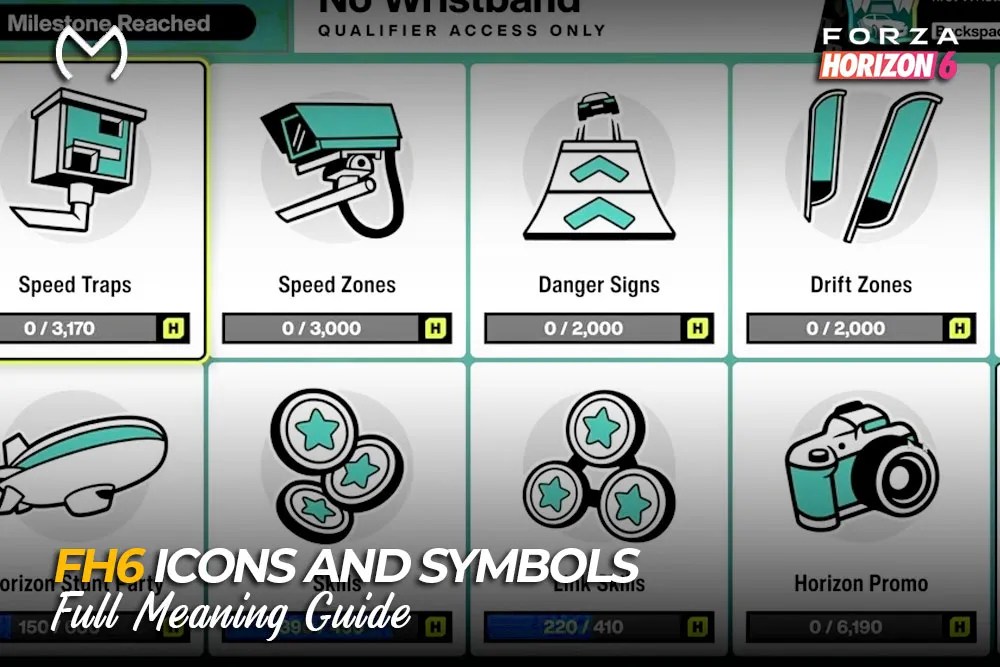
The Forza Horizon 6 map can look chaotic when races, collectibles, PR Stunts, seasonal events, and player markers appear together. Grouping symbols by what they do makes the screen much easier to read.
Quick FH6 Icon Legend
| Icon group | What it normally shows |
| Race symbols | Discipline and route type |
| PR Stunt markers | Speed, drift, jump, or timed runs |
| Purple icons | Collectibles, discoveries, and special activities |
| Grey icons | Completed or collected content |
| Playlist tiles | Seasonal challenges and rewards |
| HUD symbols | Position, route, speed, and nearby drivers |
Colour helps, but seasonal events may change a normal marker. Highlight the icon and check its name when unsure.
How to Read Race Event Icons
Race markers show the discipline and route format.
- Circuit: Several laps with the finish near the start
- Sprint: A point-to-point route
- Road Racing: Tarmac events focused on grip and speed
- Dirt Racing: Mixed surfaces where rally handling helps
- Cross Country: Rough terrain, jumps, and open routes
- Street Racing: Night races on public roads
- Touge Battle: Technical mountain-road racing
- Time Attack: A timed run against the clock
- Drag Meet: Straight-line acceleration racing
A road build may feel great on a Circuit but struggle when Cross Country sends you over fields and jumps.
What the PR Stunt Symbols Mean
Each PR Stunt asks for a different run:
- Speed Trap records your speed at one point.
- Speed Zone measures average speed across a section.
- Drift Zone scores controlled slides.
- Danger Sign measures jump distance.
- Trailblazer gives you a timed route between two gates.
A clean line usually beats reckless speed in a Speed Zone. Drift Zones reward consistency more than one huge slide.
Collectible and Discovery Markers
Purple markers often lead to exploration content. Board-shaped symbols point to Bonus Boards, while food-themed faces represent FH6 Regional Mascots. Once collected, both normally remain visible in grey.
Other markers include:
- Barn Finds and Treasure Cars
- Player Houses and Festival Sites
- Landmarks and Discover Japan locations
- Car Meets and Aftermarket Cars
- Horizon Stories and Jobs
Barn Finds and Treasure Cars can look similar, but their unlock methods differ. Check the label before travelling across the map.
Festival Playlist and Reward Symbols
The Forza Horizon 6 Festival Playlist uses icons for Photo Challenges, Treasure Hunts, The Trial, Monthly Rivals, EventLab, seasonal championships, and skill objectives.
Reward symbols usually show what you will earn:
- Car silhouette: vehicle reward
- Shirt icon: clothing item
- CR: Credits
- Character icon: emote
- Paint-style icon: livery
- Music note: song
- Wheel icon: Wheelspin or Super Wheelspin
Open the event tile first. A seasonal championship may require a specific class, manufacturer, or several wins.
Wristbands, Stamps, and Progression Symbols
Wristbands and Stamps track different parts of FH6.
- Wristbands belong to Horizon Festival progression.
- Stamps track Discover Japan and the Collection Journal.
- Festival Points move you toward the next Wristband.
- Discovering Japan’s progress comes from exploration, photos, stories, mascots, Touge Battles, and other activities.
Once these symbols make sense, unfinished unlocks are easier to spot. Players keeping their current save but short on time can use an FH6 account upgrade option for selected progression goals.
Car Class, Drivetrain, and HUD Icons
The letters D, C, B, A, S1, S2, R, and X show performance class, while the nearby PI gives the exact rating. FH6 introduced R Class for track-focused cars.
- FWD: Front-wheel drive
- RWD: Rear-wheel drive
- AWD: All-wheel drive
During races, the mini-map arrow marks your car. Nearby markers show opponents or online drivers, while the position counter, timer, route line, speedometer, skill meter, and objective alerts provide live information.
How to Filter a Crowded Map
- Open the world map.
- Select Filter.
- Hide every category you are not chasing.
- Leave one or two activity types visible.
- Restore All Items when finished.
When a marker has not appeared, revealing all FH6 map icons may require exploration, more progression, another filter, or the optional Treasure Map.
Explore useful FH6 rewards and garage upgrade services:

Xbox and PlayStation Button Symbols
PC players may see A, B, X, Y, LB, and RB prompts while using a DualSense controller. Check Steam Input and controller settings first. Unofficial mods can replace them with PlayStation glyphs, but they are third-party changes.
Final Takeaway
Separate FH6 icons into races, PR Stunts, collectibles, Playlist tasks, progression symbols, and HUD alerts. Read the activity name, follow the marker shape, and use filters whenever the map feels overloaded.
FAQs
What do grey icons mean in Forza Horizon 6?
Grey usually means the activity is complete or the collectible has been claimed.
What do purple icons mean in FH6?
They commonly mark collectibles, discoveries, hidden vehicles, or special exploration content.
How do I hide map symbols?
Open the world map, choose Filter, and disable categories you do not need.
What is the difference between Wristbands and Stamps?
Wristbands track Horizon Festival progression. Stamps track Discover Japan and the Collection Journal.
Why does FH6 show Xbox symbols with a PlayStation controller?
Steam Input and controller detection can make the PC version display Xbox-style prompts.



