




Unlocking limited-time event loot from events like the Marvel Rivals IGNITE 2026 usually breaks down to two simple mistakes: forgetting to link your profile beforehand, or realizing a stream ended five minutes ago.
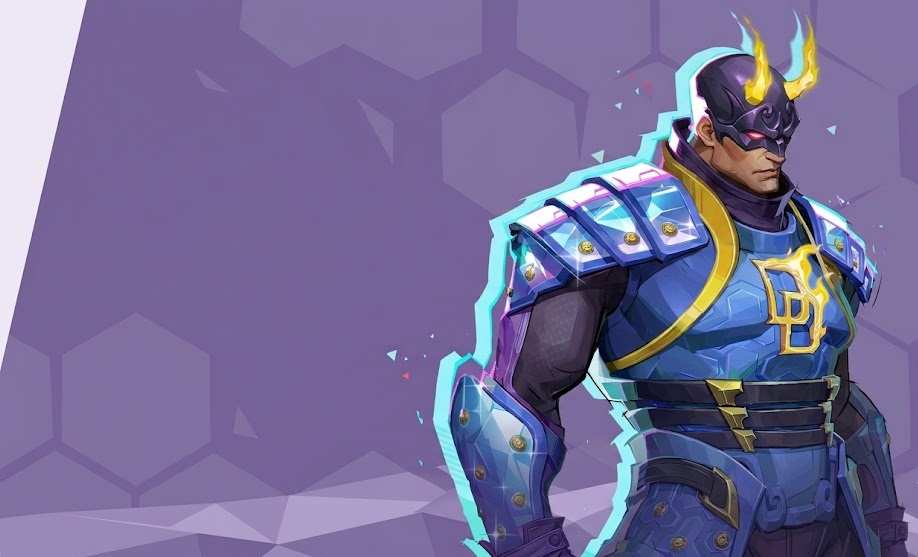
Keeping an eye on the Marvel Rivals Official Esports Hub ensures you actually catch the broadcast windows. That means fewer missed drops and a much better shot at grabbing exclusive gear like the IGNITE Daredevil suit and bonus Chrono Tokens.
Below is everything you need to know about stream schedules, account connections, and claiming every reward before the event ends.
Marvel Rivals IGNITE 2026 Twitch Drops Schedule & Drop Windows
Planning your stream viewing around exact tournament stages prevents missing high-value cosmetic tiers. Earning Marvel Rivals esports drops rewards requires watching participating channels during designated broadcast hours.
Marvel Rivals IGNITE 2026 Schedule
| Tournament Stage | Broadcast Dates | Stream Window | Primary Drop Rewards |
| Stage 1 Qualifiers | May 21 – July 5 | 14:00 – 22:00 EST | IGNITE Nameplate & Spray |
| Mid-Season Qualifiers (Promotion & Relegation) | July 17 – July 19 | 14:00 – 22:00 EST | IGNITE Nameplate & Spray 100x Chrono Tokens |
| IGNITE Mid-Season Finals | July 29 – August 1 | 12:00 – 00:00 EST | Marvel Rivals Event Hero Skin |
Complete Rewards Breakdown: What You Can Earn
Every drop tier adds unique value to your in-game collection. The main attraction for 2026 features the limited-edition hero outfit tailored specifically for tournament viewers.
30-Min to 1-Hour Tier: Event Cosmetics
Setting up early unlocks introductory profile items:
- IGNITE Event Spray: A collectible in-game spray featuring official 2026 tournament branding (Unlocked at 30 minutes).
- IGNITE Tournament Nameplate: A limited-edition background border for your player profile (Unlocked at 1 hour).
2-Hour Tier: Chrono Tokens & Emotes
Accumulating watch time helps you advance your seasonal progression:
- 100 Chrono Tokens: Unlocked after 2 cumulative hours of stream watch time.
- Event Victory Emote: Grants an event-themed victory emote at 2 hours of watch time.
4-Hour Tier: Flagship Hero Costume
The main attraction of the tournament campaign drops at the final watch-time threshold:
- Marvel Rivals Event Hero Skin: The flagship reward for the Mid-Season Finals, unlocked at 4 cumulative hours. This variant features exclusive tournament-themed trim and will not appear in the standard rotating shop.
Summary of Marvel Rivals Esports Drops Rewards
| Cumulative Watch Time | Unlocked Reward | Item Category |
| 30 Minutes | IGNITE Tournament Spray | Profile Cosmetics |
| 1 Hour | IGNITE Tournament Nameplate | Profile Cosmetics |
| 2 Hours | 100 Chrono Tokens + Hero Emote | In-Game Currency & Emote |
| 4 Hours | Flagship Event Hero Skin: IGNITE Daredevil Costume | Flagship Hero Skin |
Chrono Tokens help players level up their Battle Pass tiers faster to unlock rewards across Battle Pass tiers. Matching these tournament tokens with profile cosmetics from our How to Get Lord Icons in Marvel Rivals guide helps complete your profile look.
Step-by-Step: Marvel Rivals Twitch Drops Account Link
Setting up your account connection correctly ensures every minute of stream watch-time counts toward your rewards.
Step 1: Log Into Your NetEase Account
Head over to the official NetEase connection portal for Marvel Rivals. Sign in using the primary NetEase credentials tied to your main gaming profile. If you usually sign in via a launcher, make sure you use the exact email associated with your game data so your progress stays synced.
Step 2: Connect Your Gaming Platform (Steam / Console)
Select your active gaming platform. That could be Steam, PlayStation Network, Xbox Live, or the Epic Games Store. Follow the on-screen prompt to authorize the connection.
Double-check that your active gamertag or display name appears on the confirmation screen. Linking the wrong platform profile will send your drops to a dead account.
Step 3: Link Your Twitch Profile
Click the Twitch connection button on the portal page. A browser pop-up will ask you to log into Twitch and approve the account permission request. Once authorized, verify that your Twitch username shows up as “Connected” on the NetEase dashboard before opening any live streams.
Step 4: Claim Your Drops in Inventory & In-Game Mail
While watching an eligible stream, keep an eye on your Twitch Drop progress bar. Once a reward tier reaches 100%, head to your Twitch Drops Inventory to manually hit Claim.
After claiming on Twitch, launch Marvel Rivals and open your in-game mailbox to collect your items. During heavy tournament traffic, rewards can take anywhere from a few minutes up to 72 hours to land in your inbox.
Marvel Rivals Twitch Drops Inventory Claim Protocol
Watch progress tracks on your Twitch profile page. Once your watch bar hits 100%, visit the Twitch Drops Inventory within 24 hours to select Claim.
Items transfer directly to your in-game mailbox after claiming, though heavy server traffic during tournament finals can delay delivery up to 72 hours.
If seasonal quests slow down your account progress while watching streams, check out our Marvel Rivals Challenge Boosting options to keep your account moving forward.
Watch-Time Optimization & Troubleshooting Matrix
Twitch tracking algorithms occasionally freeze progress bars. Simple browser tweaks keep your watch time counting smoothly.
Browser & Audio Settings
Background tab throttling in modern browsers often pauses Twitch timer scripts. Avoid this tracking freeze with these habits:
- Mute the Tab, Not the Player: Keep the Twitch video player volume above 10%. Mute the entire browser tab instead.
- Single Stream Focus: Opening multiple tournament streams simultaneously freezes tracking across all channels. Keep just one official stream active.
- Maintain Window Visibility: Avoid minimizing the browser window completely. Leaving it open in a separate window keeps the progress timer active.
Resolving Stuck Progress
When progress stalls near completion, use these fixes:
- Refresh your active stream tab to reset the tracker connection.
- Unlink and re-link your Twitch account in the NetEase portal if your claim button fails to register.
- Check that your chosen stream displays the active “Drops Enabled” tag under the video title.
Maximizing Your Competitive Edge
Watching top-tier esports matches gives you a front-row seat to high-level team compositions and map strategies. Studying pro positioning during tournament streams helps refine your tactical play for competitive mode.
Compare your current match stats with the broader player base through our Marvel Rivals Rank Distribution, Percentages & Average Rank breakdown.
If you want to unlock high-tier cosmetics alongside your tournament loot, explore our Marvel Rivals Achievements Boost to clean up difficult achievement lists fast.
Check out some of our most popular Boosting services:


Frequently Asked Questions
Can I earn tournament drops using the Twitch mobile app?
Yes, mobile viewing counts toward your watch time. Open the official Twitch app on iOS or Android, log in, and watch an eligible stream. Remember to visit your mobile inventory tab to claim rewards manually.
What happens if I forget to claim my reward within 24 hours?
Unclaimed items inside your Twitch inventory expire after the event window closes. NetEase customer support cannot grant unclaimed items retroactively once the campaign timer ends.
Do I need an active Twitch Prime subscription to get these rewards?
No, standard free Twitch accounts qualify for all tournament rewards. You only need a verified account linked to your NetEase profile.
Final Thoughts
Earning tournament rewards comes down to syncing your accounts early and keeping track of live broadcast hours. Setting up your profile connection ahead of time guarantees your watch time turns straight into exclusive cosmetics and extra Chrono Tokens.
Once your tournament rewards land in your in-game inbox, team up with our professional squad through Marvel Rivals Rank Boosting to show off your new gear at the top of the leaderboards.