


































Creating full 3D video games used to require a powerful PC, complex coding knowledge, and hours spent navigating desktop engines.
Roblox is changing that dynamic entirely by moving full-scale game development directly to smartphones with its new Roblox Build Mobile AI feature. You can read the full details in Roblox’s official newsroom update.
If you want to see how top community-created titles hold up, check out our Grow a Garden Review.
What is Roblox Build? The Mobile AI Game Creator
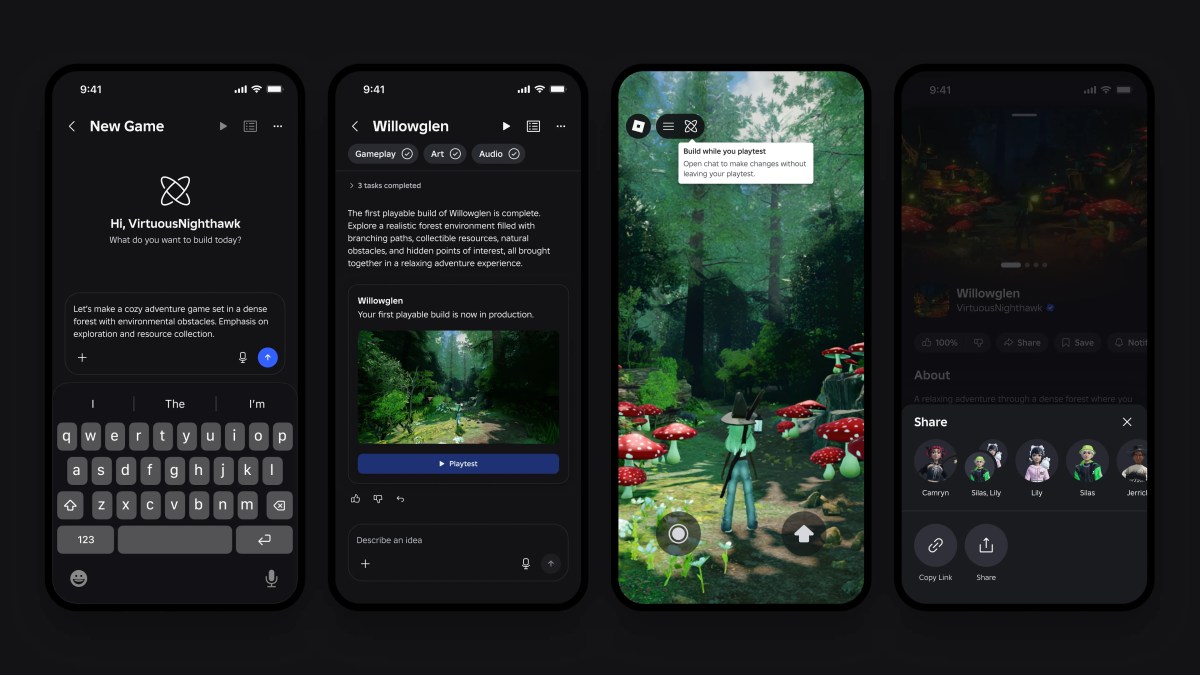
Roblox Build is a new mobile-first feature embedded directly inside the main Roblox app on iOS and Android. Roblox Build enables creators to draft, test, and publish playable 3D experiences using simple text prompts on their phones.
How Text-to-Game Prompting Works on Mobile
Creating a world with Roblox Text to Game AI starts with a single prompt. You type what you want. For example:
“a neon-lit obstacle course with floating platforms and low gravity”
The tool then generates a layout, visual style, and basic gameplay mechanics in seconds. You can tweak individual elements using conversational follow-up prompts or manual drag-and-drop touch controls.
The New Creation Tab & App UI
Accessing these tools does not require navigating complex menus. Roblox added a dedicated Roblox Mobile AI Creation Tab right on the app’s bottom navigation bar.
- Instant Preview: Test your game immediately in single-player mode.
- Touch-Native Controls: Adjust object placement, lighting, and camera angles with simple mobile gestures.
- On-the-Go Iteration: Make real-time edits while riding the bus or waiting in line.
Powered by “Cube 3D”: The Science Behind the AI Engine
At the core of this tool is the Roblox Cube 3D foundation model. A multimodal AI engine trained specifically on 3D spatial data, physics, and interactive logic.
Beyond 3D Meshes: Understanding 4D Interactive Generation
Most AI generators only build static 3D visual models. Cube 3D goes a step further by generating what developers call “4D” assets. These are objects that carry built-in interactive behaviors and physical properties.
How 4D Generation Works
| 1. Text Prompt | ——> | “Generate a sports car” |
| 2. 3D Mesh | ——> | Creates visual body, wheels, and interior |
| 3. Rigging | ——> | Attaches axles, suspension, and steering |
| 4. 4D Logic | ——> | Adds drive script, engine sounds, collision |
When you prompt a drivable car, Cube does not just generate a car-shaped rock. It rigs the wheels, applies driving physics, and automatically attaches interaction scripts.
Roblox Studio Integration & Seamless Cross-Platform Workflows
Mobile creation does not mean desktop developers are left behind. Through Roblox Studio mobile integration, every project created in Build saves as a cloud project file.
You can draft a map on your phone during lunch, open Roblox Studio on your desktop later, and inspect the raw Luau code to polish the mechanics. Luau code is a programming language used for scripting on the Roblox Creator Hub platform.
Roblox Build Release Date, Regional Rollout & Access Rules
Roblox is taking a phased approach to testing and launching this suite of [mobile game creation tools].
| Stage | Target Audience | Key Features |
| Alpha Phase | New Zealand Users (Age 9+) | Text prompting, local testing, feedback gathering |
| Beta Phase | Broader Regional Rollout | Cloud sync, multi-user co-creation |
| Global Launch | Worldwide Age-Verified Users | Full catalogue publishing, advanced customization |
Release Timeline & Geographic Availability
The initial alpha rollout begins in late July in New Zealand. This limited regional test allows engineers to monitor server load and refine prompt accuracy before expanding to North America and Europe.
The [Roblox Build release date] for full global access will follow as regional testing milestones are met.
Age Restrictions & Monetization
Safety and quality controls determine who can publish games to the main platform.
- Age 9+: Can use Build tools to create and test games privately.
- Age 16+ (Verified): Granted permissions to publish Build games publicly to the global Roblox Discover page.
- Monetization: Creators can integrate standard developer products, similar to how players buy [in-game virtual economy items].
How Build Games Compete:
The introduction of instant AI generation naturally raises questions about platform quality and game discovery.
Will Build Lead to “AI Slop”?
When game creation becomes effortless, the volume of low-quality submissions inevitably spikes. Roblox addresses this by separating creation from distribution. Generating a game takes seconds. Getting that game onto player homepages still requires real player engagement.
Retention-Based Discovery System
Roblox does not hide AI-generated games in a separate “experimental” tab. Instead, every published game enters the main discovery algorithm.
- How Discovery Works: Roblox evaluates games based on Day 1 through Day 28 player retention, session length, and repeat visits. If an AI-generated game lacks depth, players bounce immediately. The algorithm then drops its visibility.
This mechanism protects high-quality experiences from being crowded out by low-effort flood submissions.
Beyond the Desktop: The Next Phase of Mobile Creation
Roblox Build strips away the desktop barrier. That move turns game development in Roblox into a mobile-first experience. While instant AI generation will certainly increase content volume, long-term success still hinges on solid design.
Easy prompting could build you a map, but good mechanics retain players.
For creators, the real power lies in speed: prototype ideas instantly on your phone, then polish them in Roblox Studio later. Keep an eye on early alpha feedback as global access opens up.
Looking for guides like Where to Buy Adopt Me Pets Cheap? Explore our blog for full breakdowns. If you want services to secure Roblox items, visit our product page to browse available listings.
Check out some of our most popular Boosting services:


Frequently Asked Questions (FAQ)
Is Roblox Build completely free to use?
Yes, basic text-to-game prompting and mobile creation are free for all eligible Roblox users. Roblox may introduce premium tiers later for advanced AI compute requests, but core building features remain free.
Can I edit my mobile Build creations on a PC later?
Yes. All Build projects sync automatically to your Roblox cloud account. This will allow you to open and modify them inside desktop Roblox Studio anytime.
When will Roblox Build release in the US and globally?
The tool enters closed alpha testing in New Zealand in late July. A broader rollout to the US and global markets will follow progressively based on alpha test results.