









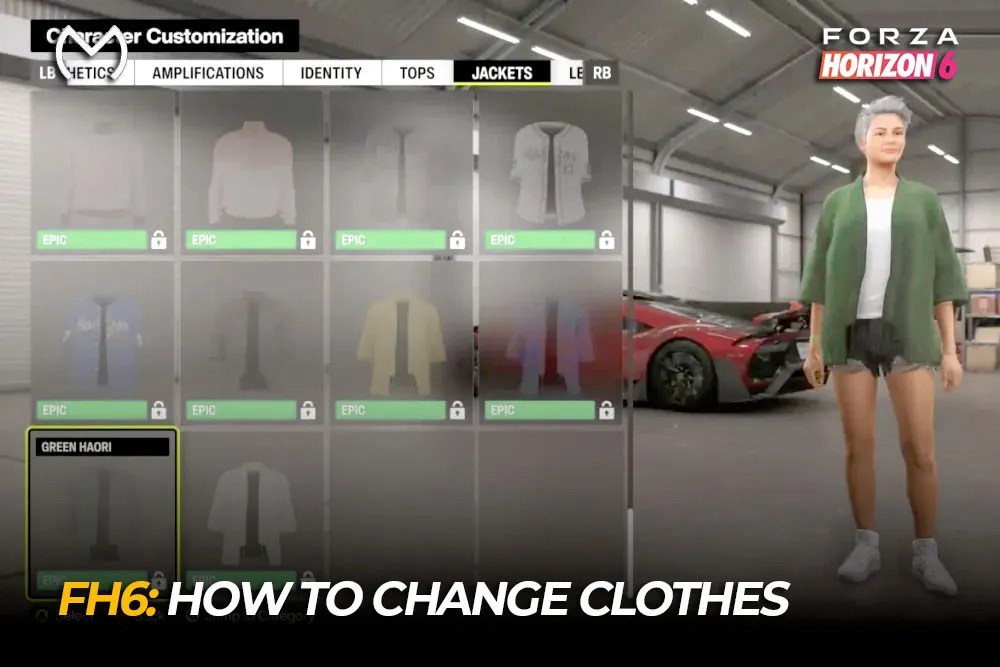
Changing your character’s clothes in Forza Horizon 6 takes a minute once you know where the wardrobe is hidden. Enter an owned Player House, Garage, or Horizon Festival area, open the Character menu, choose Customize Character, and equip the clothing or full outfit you want.
The same appearance editor covers accessories, emotes, and other avatar options, so you can update your complete look without creating a new character.
How to Change Clothes in Forza Horizon 6
Follow these steps from a House, Garage, or Festival Site:
- Open the main menu.
- Move to the Character tab.
- Select Customize Character.
- Choose a clothing category.
- Preview an item, then equip or purchase it.
- Exit after confirming your choice.
You can mix separate pieces or select a full-body outfit. Individual items let you combine tops, bottoms, shoes, hats, glasses, gloves, and accessories. A full outfit applies a complete preset and may replace several pieces at once.
How to Reach the Wardrobe from Free Roam
The Character tab may not be available while driving around Japan. Return to a location that supports character customization using one of these routes:
- Open My Horizon and travel to your main House.
- Open Cars, select Buy New & Used Cars, and accept the Fast Travel prompt to Mei’s House.
- Enter a nearby owned House, Garage, or Horizon Festival location.
After loading, open Character > Customize Character. This is quicker than manually crossing the map just to update an outfit.
Players who enjoy personalizing more than their avatar can also unlock The Estate in Forza Horizon 6 as a larger creative space for builds and decoration.
Clothing and Appearance Options
The customization screen is more than a clothing inventory. Depending on the category, it includes:
- Tops, jackets, bottoms, and footwear
- Hats, glasses, gloves, and accessories
- Full outfit presets
- Hairstyles and hair-related choices
- Skin tone and body type
- Emotes and victory celebrations
- Other appearance or voice options
Your personalized look appears outside the wardrobe too. Your avatar can stand beside your car at Car Meets and appear during social or presentation scenes.
This makes outfits useful for themed garage builds and screenshots. After capturing a look, knowing where Photo Mode pictures are saved helps you keep and share it.
How to Unlock More Clothes and Outfits
Cosmetics can come from several reward sources:
- Credits and Clothing Vouchers
- Wheelspins and Super Wheelspins
- Player-level rewards
- Festival Playlist objectives
- Seasonal challenges and events
- Discover Japan activities
- Race or progression rewards
Check owned items before spending Credits. Normal play or a Wheelspin may already have added clothing to your wardrobe.
Some cosmetics are tied to progression rather than the shop. The main Forza Horizon 6 progression paths help explain rewards connected with Wristbands, Stamps, Horizon Play, and other milestones.
Explore FH6 services for Credits, Wheelspins, and progression:

Why Are Clothes Missing or Locked?
A locked item does not always mean there is a bug. Highlight it and check the requirement shown in the appearance menu.
Common reasons include:
- You lack the required Credits or Clothing Voucher.
- It is a Wheelspin or Super Wheelspin reward.
- A Festival Playlist or seasonal objective is incomplete.
- The cosmetic belongs to a progression milestone.
- You own it, but another outfit is equipped.
When a claimed item is missing, leave the editor, re-enter the House or Garage, and check the correct category. If the inventory still has not refreshed, restart after confirming your profile has synced.
If an outfit resets, equip it again and exit the editor normally rather than closing the game immediately.
Character Clothes vs Car Customization
The Character menu controls your avatar’s apparel, accessories, emotes, and appearance. Vehicle styling remains separate, with the official FH6 customization overview detailing liveries, paints, aero, rims, and body kits.
You can match a racer outfit to a vehicle livery or garage theme without changing the car build.
Final Takeaway
To change character clothes in Forza Horizon 6, return to a House, Garage, or Festival Site and open Character > Customize Character. Mix individual items for a personal style, use full outfits for a quick preset, and check the listed requirement when a cosmetic stays locked.
FAQs
Where do you change clothes in Forza Horizon 6?
Enter an owned House, Garage, or Horizon Festival area, open Character, and select Customize Character.
Can you change clothes while driving?
Not directly. Use My Horizon or Buy New & Used Cars to Fast Travel to a supported location, then open the wardrobe.
How do you get free outfits in FH6?
They may come from Wheelspins, Super Wheelspins, player levels, Discover Japan, seasonal challenges, and Festival Playlist rewards.
Can you change body type and skin tone?
Yes. The appearance editor includes these options alongside clothing, accessories, full outfits, and emotes.
Why is a purchased or earned outfit missing?
Check the correct category, confirm it was claimed, re-enter the customization area, and restart after your profile syncs if needed.



